Construction documents, from field to folder in seconds.
Create WIRs, MARs, MIRs and method statements in minutes. Numbers, registers, PDFs and reports are done for you — so your team spends time on site, not on paperwork.
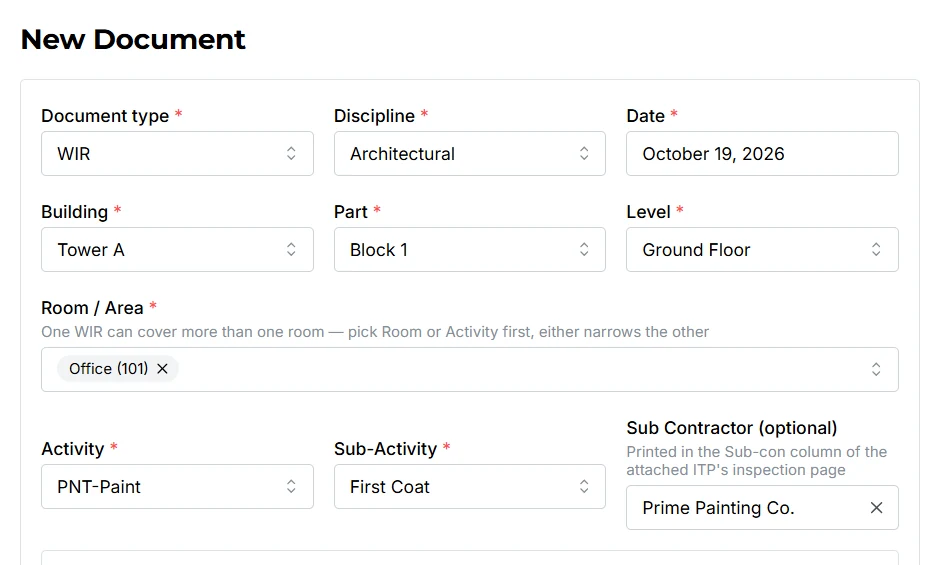
Paperwork shouldn't slow down the site
Built for QA/QC teams on projects across Saudi Arabia, the UAE, Qatar, Kuwait, Bahrain, Oman and Asia. Typing the same project details into every form. Searching for the next free number. Rebuilding registers by hand before every meeting. ADoc Flow ends all of it.
Before
Word templates copied over and over, numbers clash, registers live in five different Excel files.
With ADoc Flow
Pick the building, room and activity — the form fills itself, gets the next number and joins the register automatically.
The result
Fewer rejections, faster approvals, and a live picture of every document's status for the whole team.
Everything your QA/QC documents need
WIR, MAR, MIR & MTS
Work inspection requests, material approvals, material inspections and method statements — all in one place.
Automatic numbering
Every document gets the correct project number and revision — no clashes, no gaps.
Internal QC review
Documents are checked and approved inside the team before they ever reach the consultant.
Client status A / B / C
Record Accepted, Accepted with Comments, Revise & Resubmit — and see what needs action.
ITP & registers
Inspection and test plan pages, shop drawing and material registers kept up to date automatically.
Live dashboard
Status totals, monthly progress, by subcontractor and by engineer — download as Excel or PDF.
Drawing room highlight
The inspected room is highlighted on the drawing automatically and attached to the WIR.
One-click PDF packages
Form, ITP page, drawing, photos and attachments compiled into one submission-ready PDF.
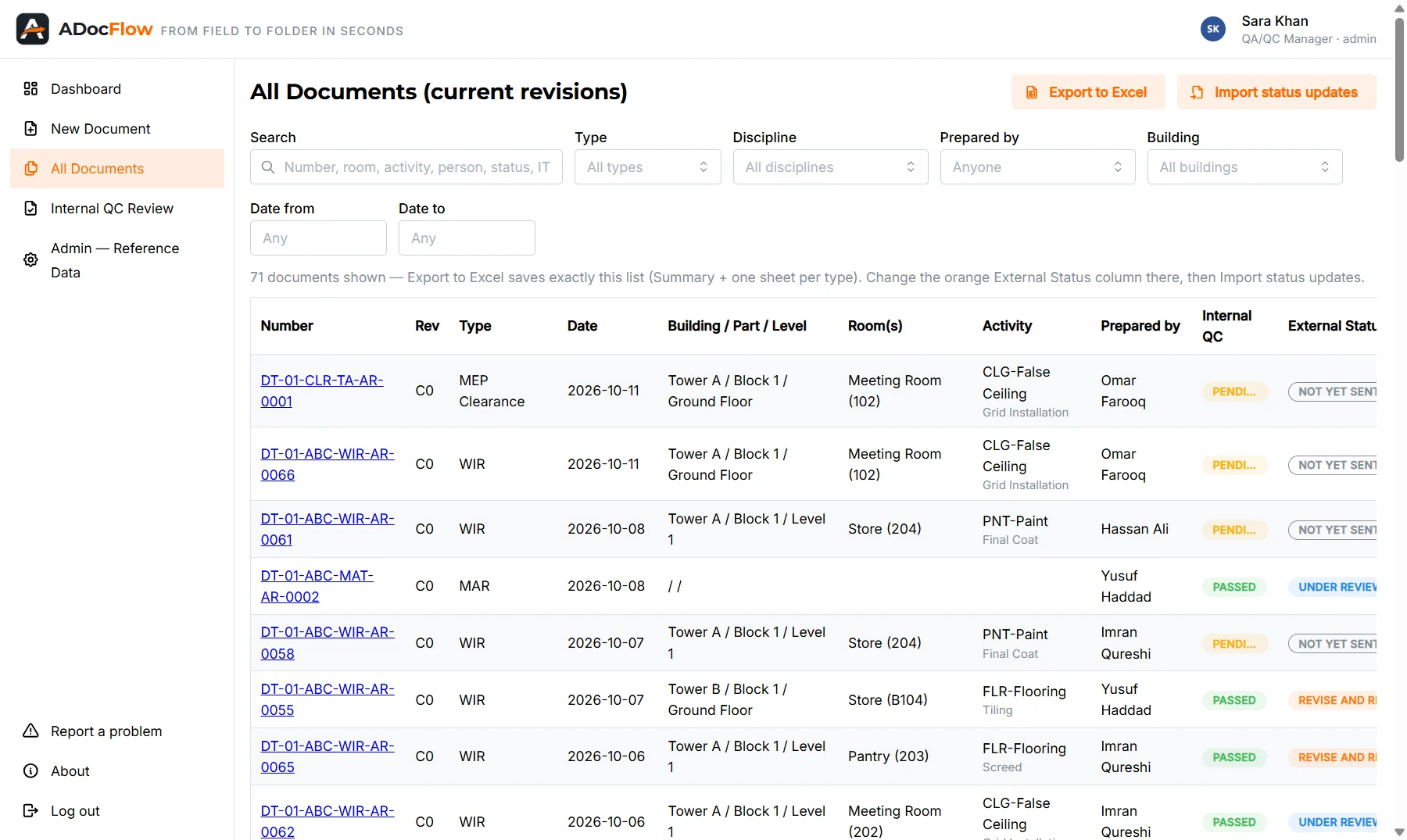
Find any document in seconds
Every WIR, MAR, MIR and clearance in one searchable list.
- Search by number, room, activity or person
- Filter by type, discipline, building and date
- Export to Excel — and import status updates back
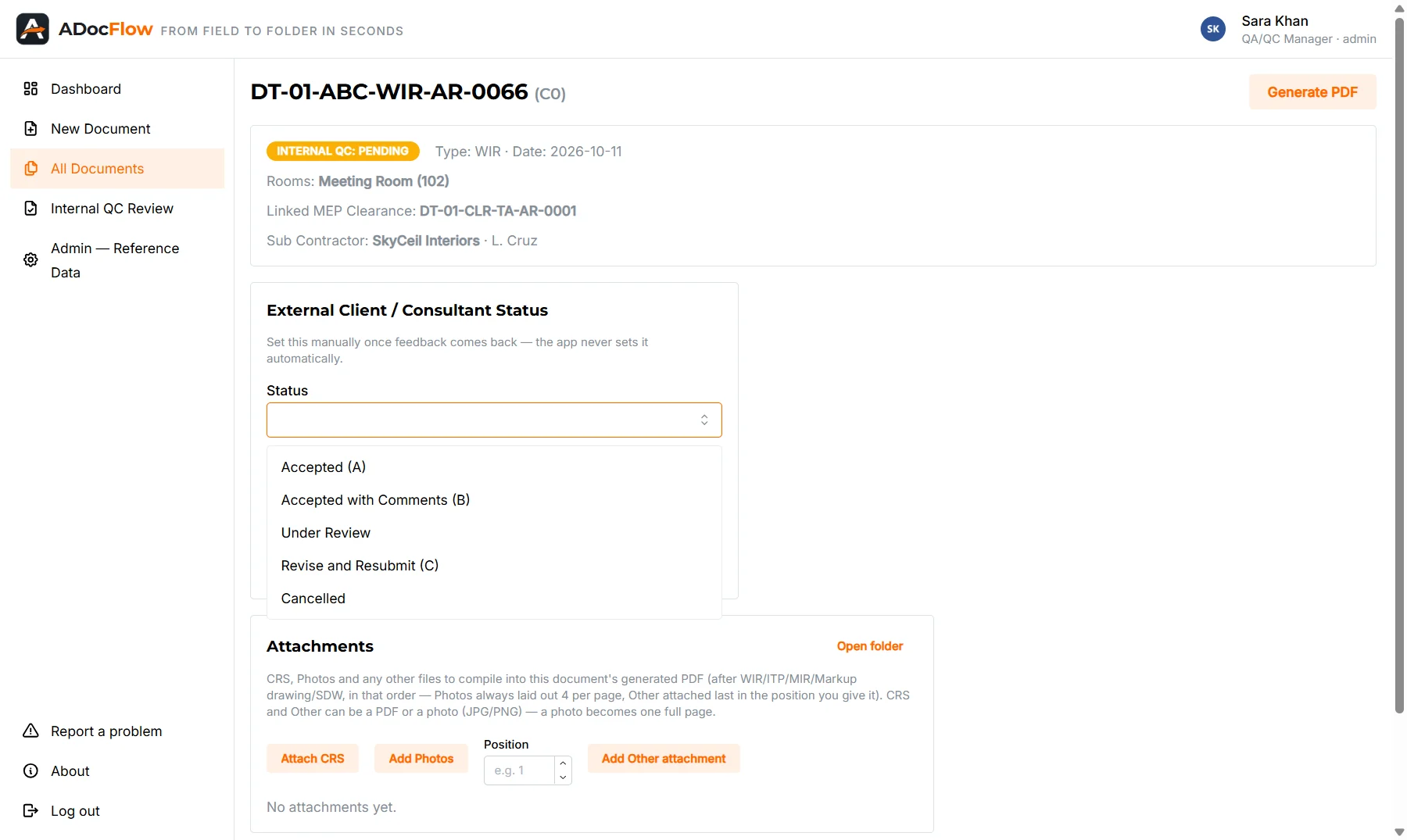
Always know what needs action
When the consultant replies, record the code in one click.
- Accepted, Accepted with Comments, Revise & Resubmit, Cancelled
- Each engineer sees their own open documents first
- Revisions keep the full history
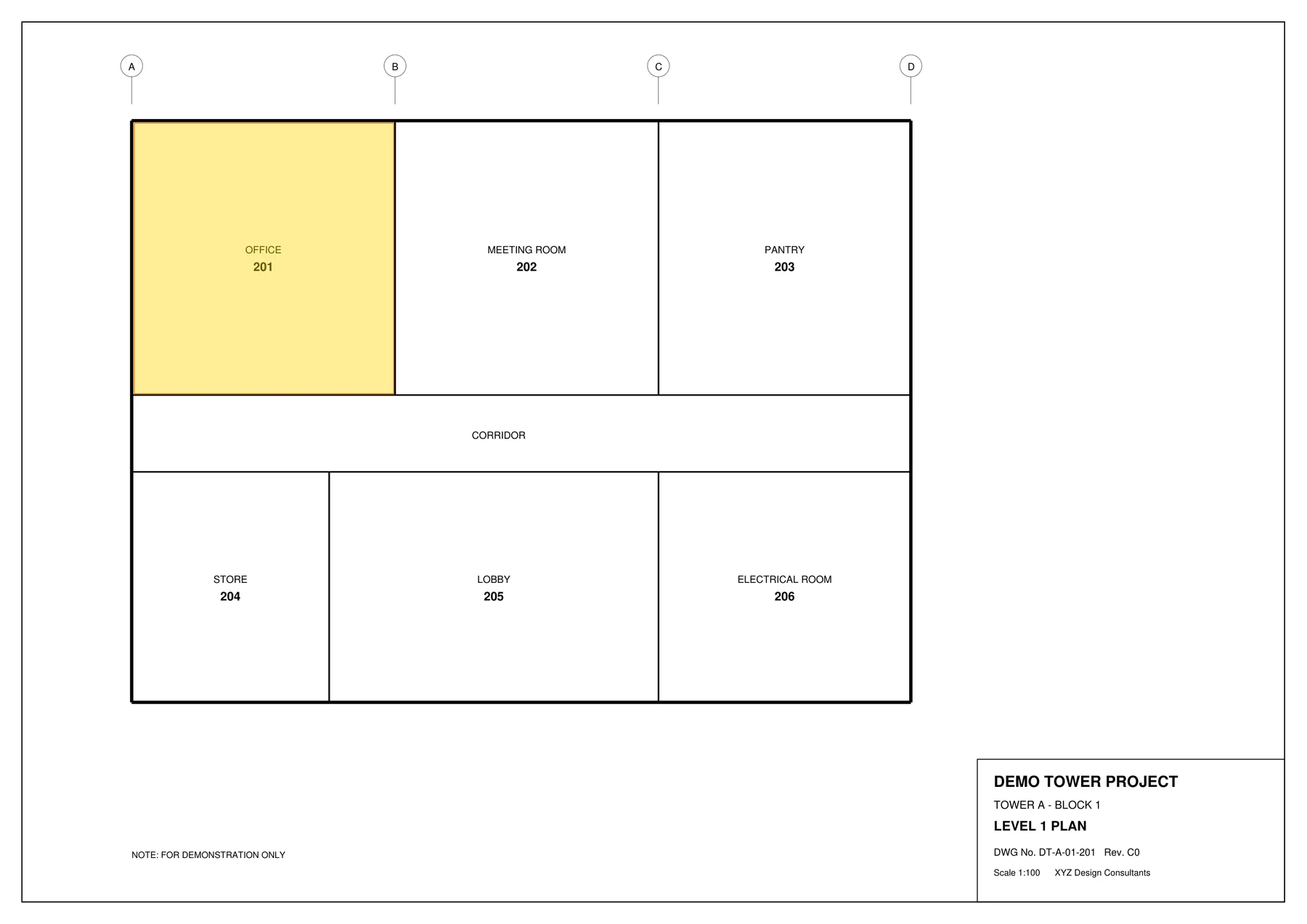
The right room, highlighted for you
Pick the room on the WIR — ADoc Flow marks it on the drawing and attaches it to the PDF.
- No more manual marking in PDF editors
- The engineer confirms before it's used
One project, three teams
See how the site team, the quality team and management work together in ADoc Flow.
Site team
Raise · attach · submit
Quality team
Review · record · report
Management
See everything, change nothing
Test ADoc Flow in your browser — nothing to install
Soon you'll be able to open the real app right here and try it with a sample project — create a WIR, generate the PDF, approve it and watch the dashboard update. Request early access and we'll send you a free trial in the meantime.
- Real screens, real results
- Your own private demo space
- Like it? Order and we set it up for your project
For the whole team, or just for you
Company edition
- Multiple users with roles: engineer, QA/QC, admin, management
- Internal QC review and approvals
- Dashboards, Excel and PDF reports
- Management view-only access
- Employee of the Week / Month
- Set up with your project's forms and numbering
Personal edition
- One engineer, one PC
- Your own numbering and signatures
- WIR, MAR, MIR and registers
- One-click PDFs
Questions about ADoc Flow
What is ADoc Flow?
ADoc Flow is construction document control software for QA/QC teams. It creates work inspection requests (WIR), material approval requests (MAR), material inspection requests (MIR) and method statements, numbers them automatically, keeps every register up to date and produces submission-ready PDF packages.
Which documents can ADoc Flow prepare?
WIR, MAR, MIR, method statement submittals (MTS) and MEP clearance forms, together with ITP pages, highlighted drawings, photos and attachments. It also keeps the ITP, shop drawing and material registers and exports weekly status reports to Excel.
Can ADoc Flow use our consultant's own forms?
Yes. During setup we load your project's own forms, document numbering, buildings, rooms and activities, so every PDF matches what your consultant expects.
Does it work without internet on site?
Yes. ADoc Flow runs on your Windows PC and works fully offline, so a dropped site connection never stops your team. Online team sync is coming soon.
Which countries is ADoc Flow for?
ADoc Flow is built for construction projects across the Gulf — Saudi Arabia, the UAE, Qatar, Kuwait, Bahrain and Oman — and Asia.
How much does ADoc Flow cost? Is there a free trial?
Pricing depends on your team size and edition (Company or Personal) — contact us for a quote. A free trial is available so your team can test it on a real project first.
Up and running in three steps
Try it
Use the online demo or ask for a free trial.
We set it up
Your project's buildings, rooms, activities, forms and numbering — loaded for you.
Your team starts
Short training, then your first documents the same day. We stay on hand for support.
Ready to stop fighting paperwork?
Talk to us — we reply on WhatsApp.