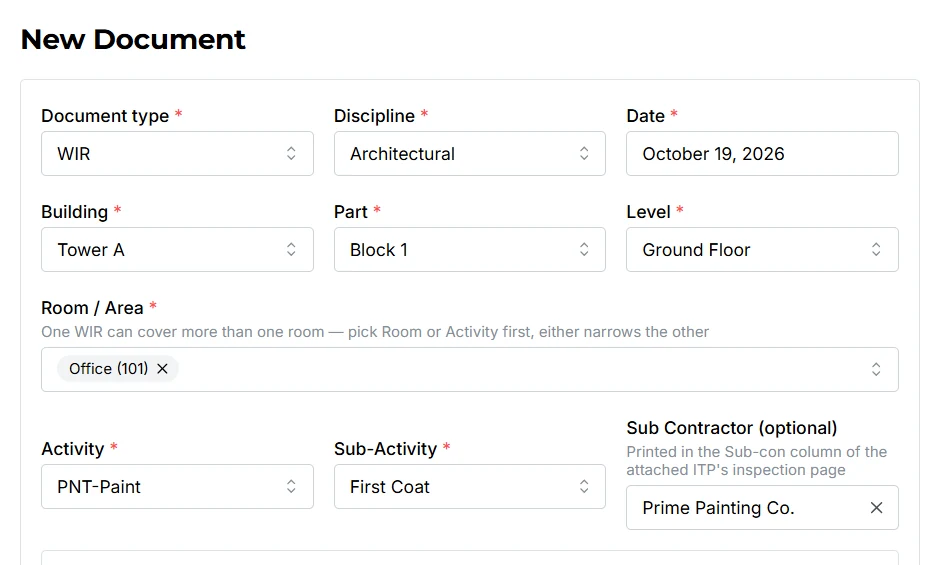
Short answer: a WIR (Work Inspection Request) is a form the contractor sends to the consultant to ask for an inspection of completed work before the next activity can start. For example, rebar must be inspected and approved before concrete is poured. The consultant inspects the work on site and returns the WIR with a status such as approved, approved with comments, or rejected.
WIR meaning and why it matters
WIR stands for Work Inspection Request. Depending on the project, you may also see it called an Inspection Request (IR), a Request for Inspection, or a WIR/IR. They all mean the same thing: a formal, numbered request from the contractor asking the consultant (the engineer's representative) to come and inspect a piece of work.
Many activities on a construction site get covered up by the next activity. Rebar disappears inside concrete, pipes are hidden behind walls, and waterproofing goes under screed. Once they're covered, nobody can check them. The WIR makes sure the work is inspected and accepted while it can still be seen and corrected.
For the contractor, an approved WIR is also evidence. It proves the work was inspected and accepted on a certain date. That matters for interim payments, for handover, and for any dispute later.
How the WIR process works
The details change from project to project, but the flow is almost always the same:
- Approved documents first. The method statement, Inspection and Test Plan (ITP), shop drawings and materials for the activity are already approved.
- Work is completed. The site team finishes the activity, or a defined part of it, such as one slab pour area or one floor of blockwork.
- Internal check. The contractor's own QA/QC engineer checks the work against the ITP checklist before anyone calls the consultant.
- WIR is raised and submitted. The form is filled in, numbered, signed and submitted with its attachments. This must be done within the notice period, often 24 hours before the inspection.
- Joint inspection on site. The consultant's inspector checks the work, often together with the contractor's engineer.
- Status returned. The consultant writes the result and any comments on the WIR and returns it.
- Next activity or rework. If approved, the next activity can start. If rejected, the defects are corrected and a new or revised WIR is submitted.
Hold points: in the ITP, some inspections are marked as hold points. Work must stop until that inspection is approved. Others are witness points: the consultant is invited, but work may continue if they don't attend. A WIR is mandatory for every hold point.
What a WIR format contains
Every consultant has their own layout, but almost every WIR format has the same building blocks:
| Section | What to fill in |
|---|---|
| WIR number | A unique number following the project's numbering system, for example PRJ-WIR-B2-0147 (project, document type, building, serial). |
| Project details | Project name, contract number, contractor and consultant. |
| Discipline & activity | Civil, architectural, MEP and so on, plus the exact activity, for example "Rebar for slab". |
| Location | Building, level, zone, grid lines or room, specific enough that the inspector goes straight to the right place. |
| References | Approved drawing number and revision, ITP number, method statement and material approvals used. |
| Inspection date & time | When the work will be ready, respecting the notice period. |
| Attachments | Drawing with the inspected area highlighted, filled-in ITP checklist, survey or test results, and photos if required. |
| Result & comments | Completed by the consultant: status code, comments, name, signature and date. |
How to prepare a WIR, step by step
- Check that the documents are approved. The shop drawing, method statement and materials must all be approved. A WIR that refers to an unapproved drawing will be rejected.
- Do your own inspection first. Walk the area with the ITP checklist and fix the defects before you raise the WIR, not after the consultant finds them.
- Take the next number. Use the next serial number in the WIR register for that building or discipline. Never reuse a number, even if a WIR was cancelled.
- Describe the work precisely. Give the exact activity and location. "Blockwork, Level 3" is too vague. "Blockwork, Level 3, Apartments 301–304, grid A–D / 1–4" is clear.
- Reference the latest approved revision. Quote the drawing revision that was actually used on site.
- Mark up the drawing. Highlight the inspected area so there is no doubt about what the WIR covers.
- Attach the supporting documents that the ITP asks for: checklists, test reports, survey results, and the delivery notes or MIR for the materials used.
- Sign, submit and log it. Submit within the notice period and record it in the WIR register, with the submission date, status and the date it came back.
WIR status codes
Consultants return each WIR with a status. The exact letters and wording are set in each project's specification, but a common pattern is:
| Code | Typical meaning | What to do next |
|---|---|---|
| A | Approved | Proceed with the next activity. |
| B | Approved with comments | Proceed, but address the comments. |
| C | Revise and resubmit | Correct the work or the documents and submit again. |
| D | Rejected | Do not proceed. Rectify the work and raise a new inspection. |
Always follow the code definitions in your own project's quality plan. Some projects use only three codes, and some use numbers instead of letters.
WIR vs MIR: the difference
The two are often confused because they look alike and travel together. The simple rule is: a MIR checks materials, and a WIR checks work.
| WIR – Work Inspection Request | MIR – Material Inspection Request | |
|---|---|---|
| What is inspected | Completed work on site (installation, workmanship) | Materials delivered to site |
| When | After the work is done, before it is covered or the next activity starts | After delivery, before the material is used |
| Checked against | Approved shop drawings, ITP and method statement | Approved material submittal (MAR), specification and delivery documents |
| Typical attachments | Marked-up drawing, ITP checklist, test and survey results | Delivery note, mill or test certificates, MAR approval |
| Example | Rebar fixing for a slab before concrete | Steel bars arriving on site before fixing |
The order on site is usually MAR → MIR → WIR. First the material is approved on paper (MAR), then the delivery is inspected (MIR), and finally the installed work is inspected (WIR).
Common mistakes that get a WIR rejected
- The work wasn't actually ready when the inspector arrived.
- The drawing referenced is an old or unapproved revision.
- The location is vague, or the WIR covers a different area from the one offered on site.
- The ITP checklist, test results or MIR for the materials used are missing.
- The WIR was submitted without the required notice period.
- Wrong or duplicate WIR number, so the register no longer matches.
Most rejections are paperwork problems, not workmanship problems, which makes them easy to avoid with a consistent process.
Free WIR template: a clean, ready-to-use WIR format in Word, Excel and PDF is coming soon to our free templates library. No sign-up needed.
FAQ
What is the full form of WIR in construction?
WIR stands for Work Inspection Request. Some projects call it an Inspection Request (IR) or a Request for Inspection.
Who prepares a WIR?
The contractor prepares the WIR, usually the site engineer for the activity together with the QA/QC engineer, and the document controller submits it. The consultant or engineer's representative inspects and returns it with a status.
How much notice is needed before a WIR inspection?
It depends on the contract and the project quality plan. Many projects ask for 24 hours' notice, and some ask for 48 hours for major activities such as concrete pours. Always check your project's specification.
What is the difference between a WIR and a MIR?
A WIR asks the consultant to inspect completed work, such as rebar fixing or blockwork, before the next activity starts. A MIR asks the consultant to inspect materials delivered to site, checking that they match the approved material submittal (MAR).
Is a WIR the same as an RFI?
Usually not. An RFI is normally a Request for Information, a question to the designer or consultant. However, on some projects RFI means Request for Inspection, which is the same thing as a WIR. Check your project's document numbering procedure.