Short answer: MAR stands for Material Approval Request (also called a material submittal). It is the contractor's request to the consultant to approve a specific product before it is ordered. A good MAR package includes the cover form, technical data sheets, test certificates, a compliance statement against the specification, the manufacturer's and supplier's details, and samples where required. The consultant returns it with a status code such as A (approved) or C (revise and resubmit).
MAR meaning and why it matters
MAR stands for Material Approval Request. The specification for a project says what each material must achieve: strength, size, fire rating, standard, finish. Usually it allows more than one manufacturer. The MAR is how the contractor proposes one specific product and proves that it meets the specification.
Until the MAR is approved, the material should not be ordered. Ordering early is a big risk: if the MAR is rejected, the material may have to be returned or thrown away, at the contractor's cost. And once the material arrives, the MIR (Material Inspection Request) will check the delivery against the approved MAR, so the MAR must be right.
What the MAR form contains
| Field | What to fill in |
|---|---|
| MAR number, revision, date | From the project numbering system, for example PRJ-MAR-ARC-0045 Rev 00. |
| Discipline and specification section | For example Architectural, Section 09 30 00 Tiling. |
| Material description | Product name, type, size, grade, colour. |
| Manufacturer and supplier | Company names, addresses, local agent. |
| Country of origin | Where the product is made. Some specifications limit this. |
| Area of use | Where on the project it will be installed. |
| Compliance | "Complies" or "Deviates", with reference to the compliance statement. |
| Attachments list | Tick boxes for data sheet, certificates, samples, warranty, etc. |
| Consultant's action | Status code, comments, name, signature and date. |
What to attach: the MAR package
Most MAR rejections are about missing attachments, not bad products. Build the package in this order:
- Cover form (the MAR itself), signed by the contractor.
- Compliance statement: a table with each specification clause, what it requires, what the product offers, and "complies / deviates". This is the single most useful page for the reviewer.
- Technical data sheet from the manufacturer, with the proposed product clearly highlighted if the sheet covers several models.
- Test certificates and reports from accredited labs, showing the product meets the required standards (ASTM, BS EN, ISO, etc.).
- Product certificates and approvals: for example civil defense approval for fire products, or local authority or SASO-related certificates where required. Check your specification.
- Manufacturer's and supplier's profile, ISO 9001 certificate, and previous project references.
- Installation instructions and storage requirements.
- Warranty sample, if the specification asks for one.
- Samples or mock-up, labelled with the MAR number, where required (tiles, paint colours, stone, ironmongery).
Tip: number every page and add an index. A reviewer who can find the fire rating certificate in ten seconds is far more likely to approve on the first round.
The MAR process, step by step
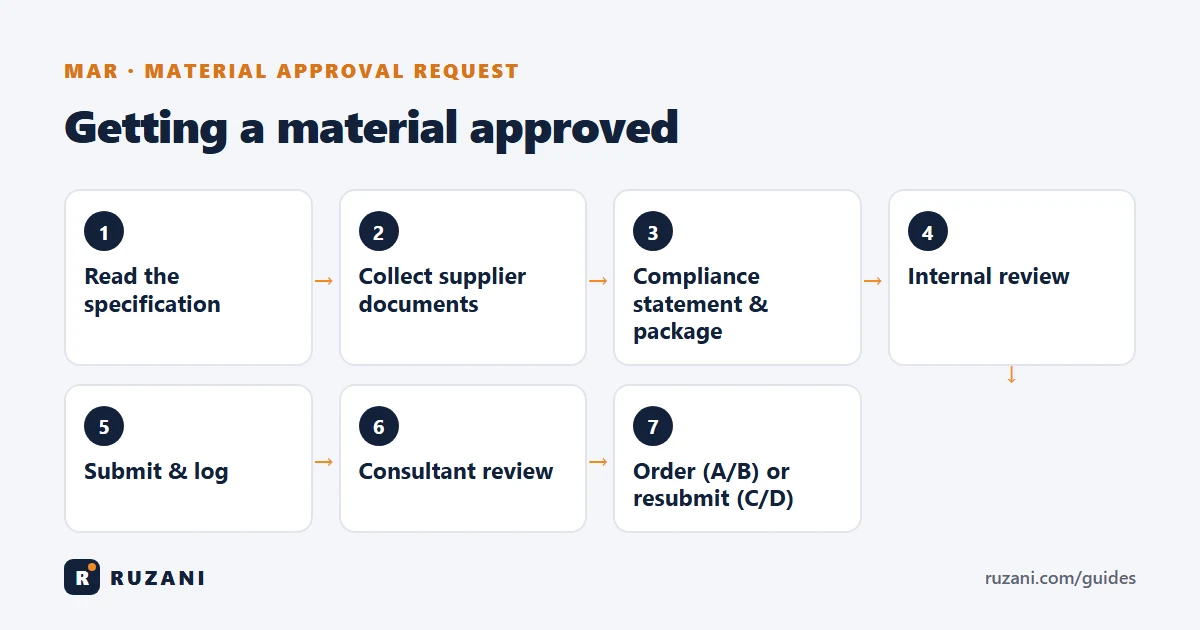
- Read the specification section and list every requirement for the material.
- Get quotations and documents from two or three suppliers, and check which product truly complies.
- Prepare the package with the compliance statement, documents and samples.
- Internal review by the technical office or QA/QC manager.
- Submit through the document controller, with a transmittal, and log it in the MAR register.
- Consultant review, usually within the period in the contract (often 7 to 14 days).
- Status returned with a code. See approval codes A, B, C, D explained.
- Order or resubmit. With A or B, place the order and share the comments with the supplier. With C or D, revise and resubmit.
Why MARs get rejected
- No compliance statement, so the reviewer has to dig for every value.
- Generic data sheet covering many models, with the proposed one not highlighted.
- Old or unrelated test reports, or reports from labs that are not accredited.
- Deviation hidden instead of declared. If a product deviates, say so and explain why it is equal or better.
- Missing local approvals required by the specification or authority.
- Different product in the samples than in the data sheet.
MAR vs shop drawing vs method statement
A MAR approves a product. A shop drawing approves how it will be built or installed. A method statement approves the procedure and safety for the activity. Big items such as façade systems or MEP equipment often need all three. See the full sequence in QA/QC documents in construction.
FAQ
What is the full form of MAR in construction?
MAR stands for Material Approval Request. It asks the consultant to approve a specific material or product before it is ordered.
What is the difference between MAR and MIR?
The MAR approves the product on paper before ordering. The MIR inspects the actual delivery on site to confirm it is the approved product in good condition.
How long does MAR approval take?
It depends on the contract, but many specifications give the consultant 7 to 14 days per submission. Every resubmission restarts the clock, so a complete first submission saves weeks.
Who prepares the MAR?
Usually the contractor's technical office or QA/QC engineer, with documents from the supplier. The document controller submits and tracks it.
Can I order material before the MAR is approved?
You can, but it is at your own risk. If the MAR is rejected, the material may have to be replaced at the contractor's cost.